In the last five years I performed more than 200 webapp pentests. Some on basic applications, while other on extremely complex ones. However, from time to time I would encounter the same “features” that proved to be vulnerable in most cases.
1. Custom Styling
Some applications prefer to give users the option to be a bit too “creative”. These app allow the use of HTML/CSS tags such that members can customize the way things look like. Whether it’s to create a table, change the background color and just resize an images, these tags open the door for client-side injection attack such as Cross-Site Scripting, HTML Injection and Content Spoofing.
- XSS can be used to run arbitrary JavaScript code in the context of other users and to some extend impersonate them and/or getting access to their account information
- HTML Injection can be used to modify what the application displays for other users. One might display a login form asking for username/password to all the other users and collect credentials from all your users
- Content Spoofing can be used to display phishing messages such as “Click here to redeem your 500$ voucher code” and redirect the user to the hacker’s website
And it’s not just the <script> and <a href> tag you should worry about when it comes to these attacks.
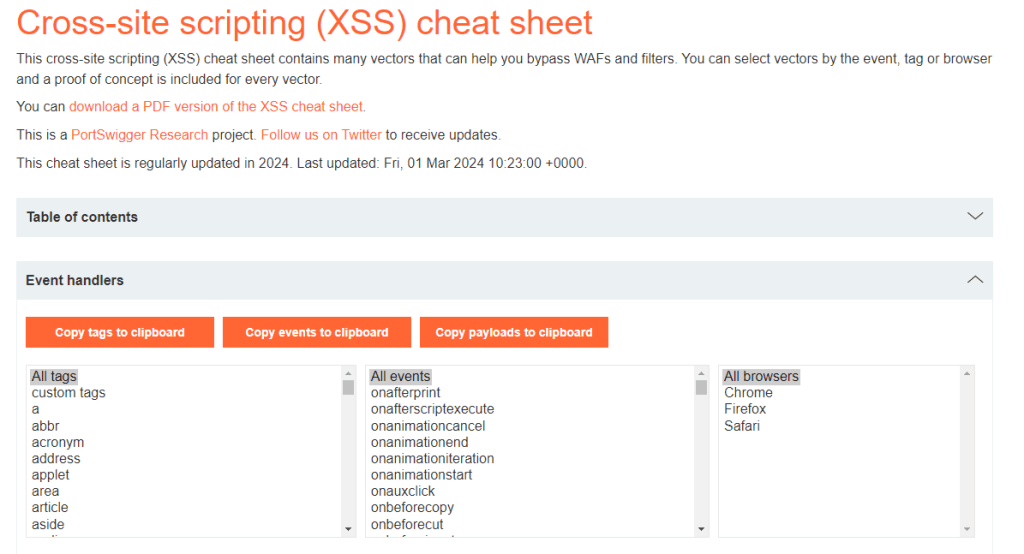
The PortSwigger XSS Cheatsheet contains more than 1000 possible payloads, combining each tag with event handlers and browser specific actions: https://portswigger.net/web-security/cross-site-scripting/cheat-sheet
2. PDF generation
Applications may need to generate PDFs based on user input for numerous reasons. It can be an invoice that contains the user’s name, a contract that contains custom comments or an export function for users to share it with their colleagues.
Whenever I encounter an application that generates these PDF documents using some input that I can control, I look for an SSRF vulnerability.
An SSRF (Server-Side Request Forgery) attack can be used by attackers to force the backend server to fetch resources from an internal/external URL. These enables the bad guys to access applications/files/services that are hosted on the internal network of your company by abusing the PDF generator function.
The <iframe> tag injected in a PDF can be used to see applications hidden behind firewalls, read cloud keys and even command execution.
In this article you can see how the PDF engine rendered the information from 169.254.169.254 (an AWS cloud internal IP address) to read the access token to the EC2 instance.

3. Custom user roles
Broken access control has been ranked 1st on the OWASP Top 10 for many years now, and that’s for a good reason.
A broken access control vulnerability occurs when users get access to information or features that they shouldn’t. This can happen in different ways:
- a free tier user can find a way to access premium features without paying
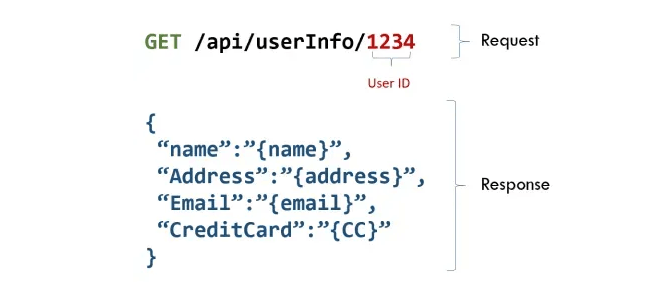
- one user may read the account information of a colleague by guessing their user ID
- regular users might access admin function by simply navigating to the /admin path
Allowing administrators to configure custom roles (on top of the regular ones: user/moderator/admin) adds even more complexity. And in almost all cases these users can act outside their intended permissions. Read more here.
If an application relies on user provided information to assess their privileges (i.e: the user ID is part of the request) attackers may use an intermediary proxy (like BurpSuite) and modify these IDs in an attempt to get the information of other users as well:
Conclusion
Some features are more likely to introduce vulnerabilities than other simply because their implementation didn’t take into consideration the security aspect. While that doesn’t mean these features cannot be secure, they require in depth knowledge of how to safely implement them such that they can’t be used by bad guys to hack your users and your infrastructure.
 > TRIPLA SECURITY